


Some hints on existing functionality that one might not be so familiar with and some features from Creo Simulate 4.0. tab.
Connections
Creo Simulate has tree default connectivities between component. You may choose between Free, Bonded and Contact for default rule for all interfaces and then define those which defer using Interface functionality. When models get larger it´s sometimes a challenge to remember classify all of them. Therefore, one might want to have a check of connectivity between components using Review Geometry functionality which can be found at Refine Model tab.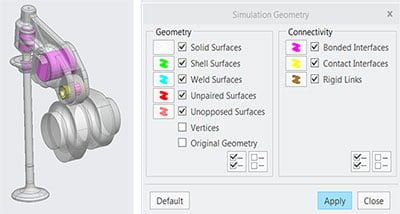
Force Balance
With some of models its quite important to get static force balance for rigid body before analysis run, since displacement constrains can bring unwanted rigidity to the model. Obviously one can calculate force balance using Free Body Diagram. Calculation can be done manually or with PTC Mathcad. Alternatively, there is a Review Total Load functionality in Loads group which will give the resultant forces and moments for selected loads. You may use this result to balance the forces resultant to zero.
Deformed shape
You can export the deformed shape from Creo Simulate Results as an Creo View *.pvs- file. This enables one to assemble the Creo View file to Creo Parametric assembly for model comparison. Just remember to export models with 1x magnification on deformation (no %- tag on) to get correct deformed shape.
Contact accuracy tuning
Sometimes contacts are used for boundary condition and sometimes to obtain exact surface pressure. For exact pressure, you might want system to really push efforts on surface pressure calculation. On the other hand, when contacts are used to describe deformation capabilities you might not need very precise contact pressure value. Therefore, it might be useful to know few config.pro options that affect the contact iteration process.
config.pro options for Creo Simulate contact analysis and their default values
- sim_max_contact_iterations 200
- limit the iteration count to get raw results out faster
- sim_contact_tolerance_factor 1
- multiply value with residual energy norm of 0 E-12
- sim_contact_penetration 5
- defines allowable interpenetration
Most of cases you can do will do better with proper mesh rather than adjusting these internal options. Sometimes both are required to get well described surface pressure distribution.
News in Creo 4.0
You’ll find Mini-Toolbar also in Creo Simulate. Just click the surface and Mini-Toolbar pops up with commonly used commands. You may customize this menu as well.
Material Enhancements
Creo Parametric has always had a possibility to use predefined materials which are stored in materials library. The materials set in Creo Parametric will appear in Creo Simulate by default. With release Creo 4.0 users will get a representative sample of Material Universe from Granta which contain 80+ materials. Additional material data and material selection tools (CES Selector) are available.
Best regards
Mikko Hinkkanen


